Recruiter LinkedIn GuideThe Recruiter's 7-Step Guide to Winning Clients on LinkedIn
-
Step 1. Understand why you’re here
Defining your goals on LinkedIn will give you direction on how you use the platform and what you say.
-
Step 2. Find your voice
This will make you more comfortable writing and give you a cohesive style.
-
Step 3. Optimise your profile
Get this right, and when your ideal clients land on your page, they’ll know you can help them.
-
Step 4. Create content
Build your content around the topics you want to be known for, then use your voice and a strong hook to make stop people scrolling.
-
Step 5. Tailored outreach
Automated outreach sticks out like a sore thumb. If you actually want replies, focus on starting real conversations.
-
Step 6. Stay visible
LinkedIn will grow your pipeline as long as you’re consistent with your activity each week.
-
Step 7. Keep at it
The main reason people don’t get the results they want on this platform? They give up too soon.
Step 1 – Understand why you’re here.
What is the purpose of your LinkedIn journey?
Is it to raise your profile? Grow your network of clients and candidates? Win more briefs? Or become the go-to recruiter clients call first?
This will give you a direction for your content and outreach.
It’s worth remembering that even if you don’t need to generate new business, you can still use these steps to grow your profile and network.
My example: In 2025, I launched my marketing consultancy from Australia. My first client was a sales recruiter — I helped them build their LinkedIn presence and start winning new business through the platform. I've since done the same for my own consultancy, and now I work with recruitment businesses to help them do the same.
Step 2 – Find your voice.
Find 5+ people whose posts you like to read. They don’t have to be other recruiters or even be from your industry. Claude can also suggest profiles for you based on your professional interests.
Think about why you like reading certain people’s content. Is it the:
Structure - are they shorter or longer sentences? Are the posts themselves longer?
Language - is it professional, corporate or more colloquial?
or Tone - is it formal, professional or more casual? Is humour used?
Write a short summary of the tone, structure and language you'd like to use.
My example: My style is pretty formal as I'm speaking to professional services leaders, but I add humour as I think it makes posts more memorable. I don't use informal words, but I like including colloquial expressions.
Step 3 – Optimise your profile
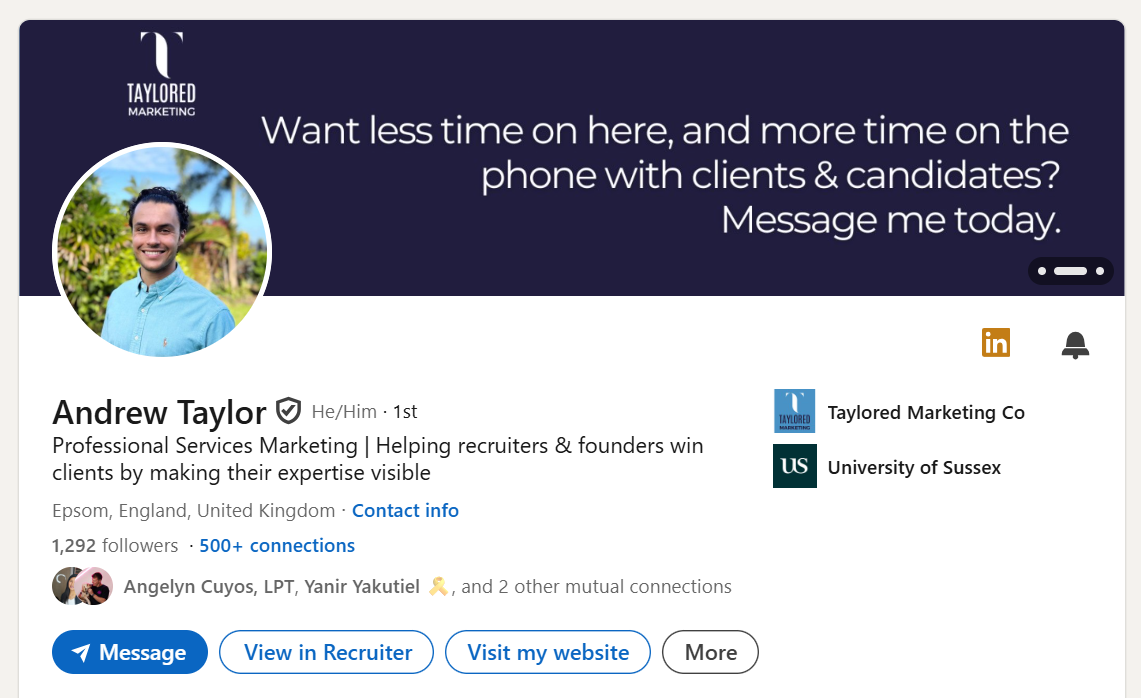
Your profile should be focused on the problem you solve for your customers:
Headline = Problem solved + industry served
Banner = A clear, simple image reinforcing the problem you solve with text.
Your About section should:
Say what challenges you solve and for who.
Give examples of your ways of working.
Include case studies and stats from your career (current role and previous work).
Include interesting areas of experience that relate to your achievements and expertise.
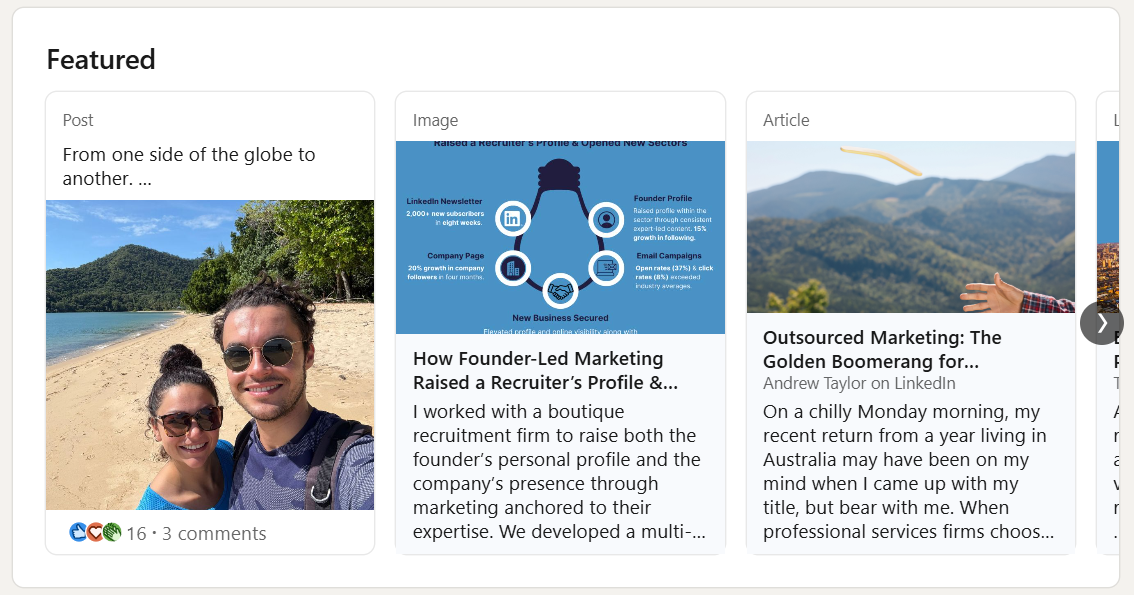
Add your best posts and educational content to your Featured section.
Don’t neglect the sections lower down in your profile, such as the ‘Licenses & certifications’, ‘Volunteering’, ‘Skills’, ‘Publications’ and ‘Recommendations’ headers. These all help visitors build a complete picture of you.
Step 4 – Anchor your content to key topic areas.
Content pillars help keep your messaging consistent and they make content creation that bit easier.
Think about the core services you offer and then think about the key related topics that you would love your known to be linked to. 5 or 6 will usually give you a good mix.
Try and find a few pillars where your views go against the grain and set you apart from others.
I usually attach a word and a statement to help me better understand each pillar.
These can change depending on your preference and positioning.
My examples:
Inspiration – Finding inspiration for posts in life/meetings/calls/emails.
Consistency - 1% Club – Very few LinkedIn users post each week, giving them a big advantage.
Outreach – You don’t need a huge audience to win clients on LinkedIn, but you do need to make your outreach human.
Individuals – Content from leaders trumps company posts & helps the overall business.
Expertise – Make expertise concrete through credible sources or it’s invisible.
Self-Development – Phones & the online world can hinder our personal growth.

The Hook
The hook is arguably the most important part of a post.
It’s the first line or two, and it’s purpose is to stop a person from scrolling and make them want to read your post.
A good hook is key, however your post also needs to deliver on its promise.
A hooks come in different forms. It can be a bold statement, it can act as a headline for your post or it can create curiosity and intrigue. You only have a few words to play with here, so make them count.
This is an excellent guide to writing a strong hook: How To Write a Good Hook
Content Ideas for Recruiters
-
Include context: the client's business, the role they needed filled, and what made it a difficult hire (tight market, niche skillset, previous agency failures, short timeline).
Summarise what you delivered: time to shortlist, quality of candidates, how you found hidden talent.
Include real figures where possible - time to fill, interviews conducted, number shortlisted, time role was vacant.
In a separate post, share a testimonial from the hiring manager.
Use the outcome as your hook. For example: "The role had been open for four months after two agencies failed to fill it. We placed someone in three weeks. Here's how."
-
Think about the challenge you can solve for your dream clients.
Choose one part of it, and help them solve it with helpful advice that they can action from that day if they choose.
Carousels, lists, diagrams are all great ways to help them visualise your content.
Give examples of how it works.
Example: “Hiring managers always ask me why they're losing good candidates at the offer stage. Here are 3 reasons your offer process is costing you hires, and how to fix them."
-
Perhaps one of the most important parts; show your character in your content, tell your story and include pictures of yourself.
As you build your following, you can create reintroduction posts to remind people of what you do, who you serve and give them more insight into you as a person.
-
Whenever you reach a company or personal milestone, share it with your network.
Think about a summary post of your recent quarter, and share your wins in one go. For example;
Number of roles filled.
Winning a retainer against a larger firm.
Filling a role that two agencies had failed to fill.
-
If you’re marketing team is already working hard publishing content, reshare it with your own views added. It will help the content travel further and give you ready-made ideas.
-
Here are some general LinkedIn content angles that most people can use:
Personal
Describe a helpful course, training or qualification you've done that has helped you become a better recruiter.
Describe an interesting meeting or activity that you have in the diary this week.
Tag and describe a hobby group, business community or volunteer group that you're a part of. How did you get into it?
Business-Focused
Your ideal client — What kind of business are they? What hiring challenges do they typically have, and why do you do your best work with them?
Who don't you work with, and why? (A sector you don't cover, a type of role outside your specialism. Being clear on what you don’t do helps build trust.)
A change you're making to how you work with clients or candidates, and how they will help.
How do you do it? Demonstrate your methods, for example, how you find hidden talent
Testimonial
Share a testimonial you've received. This can be over email or a Google review for your business.
Opinions
What frustrates you the most about your industry?
What's a common mistake you see being made in your industry? Can you flip this into positive advice for what people could do instead?
Step 5 – Tailored outreach.
Define your ideal customer and connect with them each week. You can use LinkedIn Recruiter or LinkedIn Sales Navigator to help curate leads.
Once your connection has been accepted, take the time to research a person’s profile, posts, comments and website before messaging.
In my first message, I include a compliment about their work and/or a question about their sector that they’re likely to have a view on based.
Each time you follow up, offer a helpful insight, link to a guide, rather than just a chaser message. Voice notes can also help build connections with people you haven’t yet spoken to.
Add collateral tailored to your prospect’s sector for added impact, such as an article, explainer or checklist.
Step 6 – Stay visible.
Here is the core activity which you should aim to complete each week in order to grow your audience and reach more people:
3 posts a week.
Aim for 15 thoughtful comments a week on your target audience’s content. Share valuable or different perspectives.
‘Save’ any posts you see that you may want to comment on later.
Keep adding new ICPs during each session.
Step 7 - Keep at it.
Schedule time in your diary to draft posts, conduct outreach, comment and connect with more people.
Here are some tips to make sure your time on LinkedIn is as productive as possible:
Avoid the temptation to scroll through your feed for too long.
Use Sales Navigator or LinkedIn Recruiter to keep adding target customers.
Follow up with people.
Review previous posts to identify which topics resonate most with your audience.
Follow these steps each week for long enough and you will start attracting the opportunities you’re after.
Ready to Become the Go-To Recruiter in Your Market?
These steps can help drive your pipeline while building a profile that means clients call you first.
If you want to spend less time on LinkedIn wondering what to post, and more time on the phone, winning briefs and placing candidates, I can help.
Book a call below to discuss how I can take LinkedIn off your plate.


Client Testimonials
-
![]()
From the beginning, Andrew has been an absolute pleasure to work with, friendly, polite, and genuinely engaged. He listens deeply and takes the time to truly understand my business, my goals, and the tone and ethos behind my brand. He’s also been incredibly intuitive in helping me express my voice authentically to the marketplace. Andrew is highly collaborative, brings thoughtful ideas to the table, and always delivers on time. His professionalism, creativity, and reliability make him a standout partner.
Indira Cole, Founder, Indigo People
-
![A woman smiling at a social event, wearing a black blazer with a patterned collar, in a warmly lit room filled with other people.]()
Andrew has a natural flair and enviable talent for communications - and in particular, is a masterful copywriter, which was evident during our time working together. More than his marketing, creative and communication abilities and knowledge, he is a calm and unflappable presence, diligent, detail-orientated, organised and can handle multiple projects and deadlines with ease.
Jaclyn Mangaroo, Head of Communications, The Property Institute
-
![Black and white photo of a young man smiling with arms crossed, wearing a striped button-up shirt, standing against a plain wall.]()
I regularly employ Andrew for marketing and sales campaigns for my business. He always succeeds in crafting engaging marketing output that is original and resonates with decision-makers. His marketing strategy succeeds in generating and nurturing new business. Personable, creative and a natural problem-solver who uses his initiative, I've been delighted with his results. When I need quality, creative marketing, Andrew is the first person I call.
Barry He, CEO & Founder, Levels Education
-
![Two men standing outdoors at an event, one smiling and holding a device, with a wooden scoreboard and other event signage in the background.]()
I had the pleasure of working with Andrew and I can confidently say he brings an elevated level of expertise and dedication to any business. … If you’re looking for a marketing communications professional who can elevate your brand, I would highly recommend Andrew.
Guy Nicholls, Head of Sporting, FIA Extreme H World Cup
-
![Woman with long brown hair smiling, wearing a navy blue shirt, standing against a pink background.]()
Andrew is smart, creative and focused. He is an excellent writer and delivered some brilliant pieces of writing for our various media channels over the years. Andy has always been very focused and works hard to deliver to any objective. He is extremely personable and engages a network easily with his cool, calm nature. He has delivered some exceptional events at Arena, gaining buy-in from some extremely well recognised brands and speakers regularly.
Stephanie Holme, Business Consultant
-
![A young man smiling at a conference, wearing a suit and a lanyard, in a busy indoor venue with others and informational banners in the background.]()
I had the pleasure of reporting directly to Andrew during my first few months at TPI, which happened to be an especially busy time due to the company's rebrand. Andrew's leadership was instrumental in guiding the team through this period... His ability to navigate high-pressure situations while maintaining a positive and approachable attitude makes him a brilliant marketing manager and a trusted colleague.
Harry Smith, Marketing Executive, The Property Institute